What Does “Open LMS” Mean? 10 Checkpoints for Choosing an Open-Source LMS for Corporate L&D (TCO, Security, Analytics)
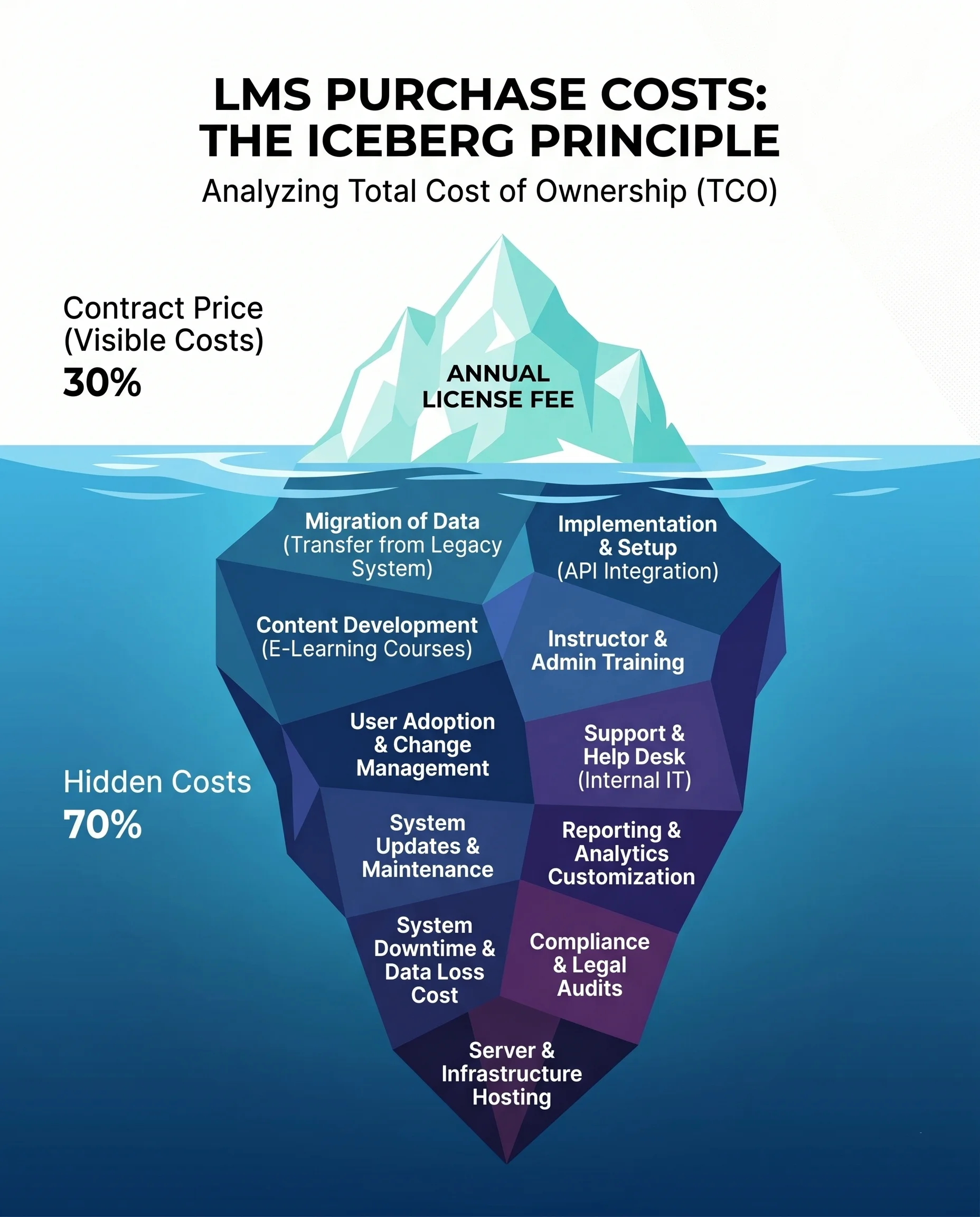
Companies usually search for “open lms” mostly to cut the license line item; but most of the cost isn’t the license fee—it’s in the system’s architecture: operations, security, and measurement.
For me, the word “open” has two meanings: freedom and responsibility. The open-source approach can produce great results in the right organization; with the wrong expectations, it can make you pay an unbelievably high price. In this article, I’ll examine an open-source LMS through the triangle of total cost of ownership + learning experience + measurement across 10 checkpoints. Some are technical, some organizational—but all tie the purchasing decision to real-world dynamics.
“We are what we repeatedly do. Excellence, then, is not an act, but a habit.” [Will Durant, Aristotle commentary, 1926]
(Choosing an LMS is like that: not a one-time purchase, but a repeated operating habit.)
1) What exactly does “Open LMS” mean—and what does it not mean?
When you say “open-source LMS,” two things get mixed up:
- Open-source software: The source code is accessible; you can modify, distribute, and adapt it to your needs (within license terms).
- Open ecosystem / integration-friendly: APIs, standards, data portability, low vendor lock-in risk.
Sometimes the search for “Open LMS” drifts into a third thing: “free LMS.” Let me make a small correction: what’s often free is the license fee; keeping the system “running inside the organization” is not free. This isn’t criticism—it’s physics: servers, updates, monitoring, security, support, development… these require energy.
The most accurate definition of an open-source LMS looks like this:
- You have control (customization, hosting, roadmap) but you also have the risk (maintenance, security, continuity, expertise)
At this point, Gökçen sometimes says a sentence while writing product scenarios: “The cost of a decision shows up when you have to repeat that decision every day.” In LMS selection, you repeat the “open” decision every day: at every update, every new reporting request, every audit...
2) Checkpoint #1 — Calculate TCO with non-license items (the real picture)
The most common mistake in TCO (Total Cost of Ownership) calculations: assuming license = cost. In open source, the license drops—but other items can grow.
Think of the table below like a “contract appendix”: for each row, ask “who is responsible, how do we measure it, what is the SLA?”
| Item | Question | Typical risk in open source | Evidence/output |
|---|---|---|---|
| Hosting | Where will it run? Cloud or your own cloud? | Capacity planning is forgotten; performance fluctuates | Architecture diagram, capacity/scale plan |
| Updates & patching | Who applies security patches, how often? | “We’ll do it later” piles up | Patch calendar, maintenance window |
| Support | 24/7? Who will handle it? | Dependency on a single person | SLA, escalation flow |
| Development | How will “let’s add this too” requests be managed? | Scope creep → perpetual project | Backlog, prioritization model |
| Content standard | SCORM / xAPI? Is there import/export? | Content can’t be moved; you get locked in | Concrete proof like SCORM import/export |
| Operations | How will assignments, reminders, periodic training run? | Excel + manual tracking returns | Automation design, logs |
| Analytics | Is there event-level data? | Blindness beyond “completed” | Traces like events/clicks/answers/time |
| Security | RBAC, encryption, audit? | Panic during audits | Policy + technical controls |
| Compliance (GDPR/HSE) | Data retention, deletion, audit trail? | Legal risk | Retention policy, audit outputs |
| Learning experience | Will users actually come? | Platform becomes an “empty building” | Activity, return rate, completion trend |
I sometimes simplify TCO like this:
TCO = License + (Operational labor) + (Cost of security risk) + (Cost of decisions you can’t measure)
That last parenthesis annoys people, I know. But what you can’t measure is “felt” inside the organization—and then comes back to you as an email.
3) Checkpoint #2 — The operational reality: the question “Who will run it?”
In an open-source LMS, the most critical thing isn’t the source code—it’s operational muscle.
Clarify these:
- Ownership: Who is the product owner? (L&D, IT, or shared?)
- Daily work: Assignments, reminders, certificate renewals, opening new roles… who will do it?
- Critical moments: Audits (HSE/GDPR), a new hiring wave, organizational change.
People can behave inconsistently here; I still haven’t fully modeled it: the same manager can say “we want automation,” then two weeks later say “let’s manually control everything.” Same person. Same quarter. This contradiction isn’t bad intent; risk perception fluctuates. The LMS you choose should be able to eliminate that fluctuation.
4) Checkpoint #3 — Content and standards: SCORM import/export is an “escape hatch”
In corporate training, content is an accumulated asset over time: slides, videos, quizzes, policy documents. When choosing an open-source LMS, I ask two questions:
- Can I bring my existing content in? (e.g., SCORM import)
- If I want to leave tomorrow, can I take my content out? (e.g., SCORM export)
This isn’t a romantic “freedom” debate; it’s a vendor management debate. Even in open source, choosing the wrong content format can effectively lock you in.
Let me give a concrete example from Nextrain: I support SCORM import and export. This keeps the door open “if you want to move to something else tomorrow”; it also simplifies your content production pipeline.
5) Checkpoint #4 — Security: RBAC, encryption, monitoring, audit (and GDPR)
Security in an open-source LMS doesn’t come automatically just because “the community is watching.” Security is a process: access + logging + encryption + monitoring + response.
Use this checklist:
- Role-based access (RBAC): Who sees what, who can do what?
- Audit trail: Who changed what, when?
- Encryption: Encryption in transit and at rest? (e.g., TLS 1.2, AES-256)
- Session security: Secure session management, API access control
- Penetration testing & vulnerability management: Regular testing, patch processes
- Data isolation: Tenant-level separation (especially in multi-company structures)
- GDPR processes: Deletion, correction, access requests; data retention periods
In my architecture, the security claim starts not at the “document” level but at the “design” level: Akira does not see personal data; PII fields are separated via anonymization (hash · mask · strip). This makes a meaningful difference when discussing GDPR: even while doing analytics and optimization, I proceed based on “behavior patterns,” not “who.”
There’s also a contractual point: customer data not being used for base model training. This materially changes vendor risk, especially in systems with an AI component.
6) Checkpoint #5 — Compliance (HSE/GDPR): the certificate cycle and audit day
Compliance trainings need two things:
- Time: periodic renewal, due date, reminders
- Trace: evidence to show during an audit
When choosing an open-source LMS, asking “does it have certificates?” isn’t enough. Ask these:
- Is certificate validity period tracked?
- Is periodic training automatically reassigned?
- Is there escalation for delays?
- During an audit, how many seconds does it take to answer “who took what?”
I treat this operation on the “Autonomy” side like a rule: automatic assignment, reminder & follow-up, certificate & periodic flows. Organizations miss a cost here that’s far larger than license cost: people’s time and audit risk.
7) Checkpoint #6 — Analytics: “Completed” isn’t a metric; it’s a closing sentence
If an LMS has no analytics, you’re left with only two things: guesswork and debate. In open source, analytics is especially critical because as you customize, measurement can fall behind.
My preferred minimum analytics level is: event-level trace.
In Nextrain, I name these traces explicitly:
- View (event tracking)
- Click (click tracking)
- Answer (answer tracking)
- Time (time tracking)
This quartet enables you to ask not “Was the training watched?” but “Where did they get stuck?”, “Which question did they drop off on?”, “At which step does the journey break?”
There’s also the question of analytics being “usable.” Dashboards can look nice but fail to produce decisions. Here I like two tools:
- Course Health Map: Which courses are problematic, which are going well?
- Detailed Course Analysis: Distribution of enrolled/completed/in progress/at risk.
The phrase “at risk” matters: analytics shouldn’t only describe the past; it should show the moment to intervene.
8) Checkpoint #7 — Decision automation: rule engine, escalation, compliance traces
Many open-source LMSs start like an “admin panel”: you click, the system applies. In corporate L&D, as scale grows, this happens: the moment you stop clicking, the system stops.
My approach is to run the system like a “campaign engine”: segment-based targeting, email + SMS distribution, automatically triggered journeys.
I split decision automation into two parts:
- AI Rules: assignment/reminder/flow with “if … then …” logic
- AI Gates: gates like retry if failed, advance if successful
When this combines with analytics, it stops being a “report” and becomes “operations.” You don’t just see; you take action. When choosing an open-source LMS, if this level of automation doesn’t exist, adding it later is often more expensive than you expect (because it’s not just a feature; it’s process design).
9) Checkpoint #8 — Integration: HR/CRM and data flow (like DataBridge)
With an open-source LMS, it’s easy to say “we’ll integrate it.” My question is sharper:
- Is the integration event-based, or is it a nightly file?
- Are identity and role changes (onboarding, transfer, role change) triggered automatically?
- Is the data flow secure and authorized?
On the Nextrain side, I handle this data flow in real time with DataBridge: HR systems, CRM, internal tools. The goal isn’t to say “we connected it”; it’s to not lose the signal that triggers learning operations.
When choosing an open-source LMS, think of integration not as an “IT project” but as “L&D’s reflex.” Because when the business changes (new product, new process, new risk), the learning flow must change too.
10) Checkpoint #9 — Learning experience: don’t let the portal become an “empty building”
The most expensive LMS is the one nobody opens. In open source, customizing the UI can be easy; but designing behavior is hard.
On the Portal side, I measure it with this sentence:
“You’re here → Next is this → Now do this.”
Pieces like the dashboard, Passport, gamification, and announcement feed ultimately serve one thing: lowering the start threshold. People don’t avoid training; they avoid uncertainty. The question “Where do I start?” is the enemy of learning and engagement.
I’ll make a small cultural connection here: Borges’s labyrinths describe the aesthetics of getting lost; internal learning platforms should not find getting lost aesthetic. (I was going to say Calvino; no, my labyrinth reflex is Borges. Calvino is more about invisible cities.) (Borges, “The Garden of Forking Paths”, 1941).
11) Checkpoint #10 — AI-native practicality: producing content + measurement, going to a report with a “question”
When choosing an open-source LMS, the question “Does it have AI?” can also be the wrong question. For me, the right questions are:
- Does AI reduce the operational load?
- Does AI make measurement understandable?
- Does AI produce decisions, or does it only write text?
I see clear benefits in two areas:
-
Content creation and transformation: converting PowerPoint into training, interactive video scenarios (branching), real-time tests and checkpoints. When content production accelerates, the “development queue” pressure that often occurs in open source decreases.
-
Access to analytics: being able to ask Akira questions in natural language inside Nextrain Analytics (like “Who hasn’t completed it in the Istanbul branch?”) takes analytics out of the realm of specialists. Filters, pivots, report templates… these can sometimes drain L&D’s energy. I prefer to save that energy for “intervention.”
I give organizations moving forward with an open-source LMS this practical recommendation: position AI not as “decoration,” but as a governance tool. Because the real cost isn’t producing a report; it’s taking the action the report requires on time.
One last page: let’s gather the 10 checkpoints into a single list
For a quick scan at decision time:
- TCO: Non-license items (hosting, updates, support, development, operations)
- Ownership: Who will run it? IT/L&D responsibility matrix
- Content standard: SCORM import/export (portability)
- Security foundation: RBAC, encryption, session security, data isolation
- GDPR: retention, deletion, rights requests, international transfer mechanisms
- Audit (HSE/GDPR): certificate cycle, periodic renewal, evidence production
- Analytics: event-level trace (view/click/answer/time), course health view
- Decision automation: rule engine, escalation, gates
- Integration: HR/CRM signal, real-time flow, secure API
- Experience: clarity of “where am I/what’s next/what should I do now”
If you want to go with an open-source approach, I’m not against it; with the right team and the right discipline, it can work very well. Just don’t translate the word “open” as “free.” “Open” opens the door; after you walk in, talk about who will clean the house.
Notes
- Will Durant, The Story of Philosophy (Aristotle commentary), 1926.
- Jorge Luis Borges, “The Garden of Forking Paths”, 1941.
- KVKK: Law No. 6698 on the Protection of Personal Data (Türkiye).
- The idea of Ebbinghaus’s forgetting curve (Ebbinghaus, 1885) wasn’t explained directly in this article, but it sits in the background of “periodic/reminder” design.